FXServer Artifacts
Which build should your server run today? The official recommended and latest artifacts, how long each build stays supported, and every build the community has reported as broken — in one place.
How to find your build number
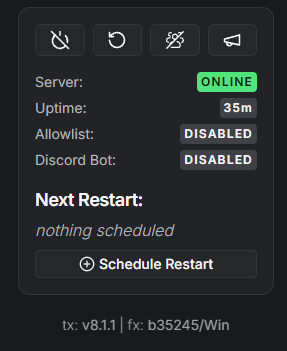
Open txAdmin and look at your server card. The circled line at the bottom shows the txAdmin version (tx:) and the FXServer artifact build (fx:) — that number is what goes in the box below.
Type version in the server console and press Enter:

Read it as FXServer-master … v1.0.0.35245 … — the number right after v1.0.0. is your build (35245 here). Paste it below.
Not the same as GameBuild. sv_enforceGameBuild in your server.cfg sets the GTA V game build (like 2802 or 2944) that clients must run —
that's a completely different number from the FXServer artifact build checked here, and the two are unrelated.
Check your build
Find it in txAdmin, or in the first line of your server console: FXServer-master SERVER vXXXX.
Builds with reported issues
| BUILD | REPORTED ISSUE |
|---|
Build channels, downloads and support windows: official Cfx.re changelog API. Broken-build reports are curated by JG Scripts through their free public API — want this check on every server start? Try their jg-artifactcheck resource.